
Vrbo Vacation Rentals
VrboTravel & Local
4.821.82K Reviews
- Version
- 2026.45.0
- Installs
- 10.00M
- Age Rating
- Everyone
Screenshots

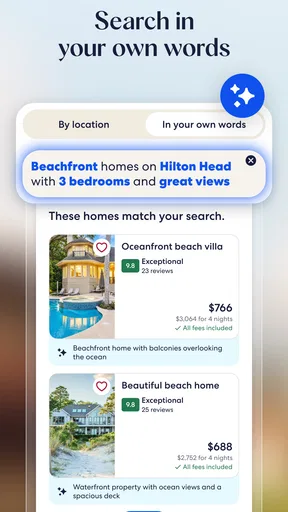
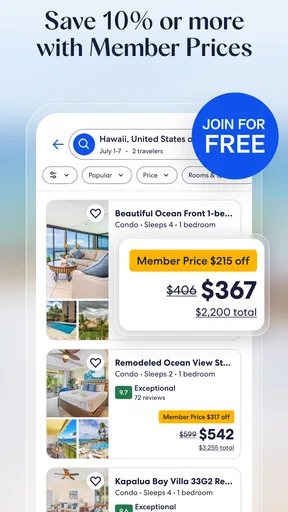

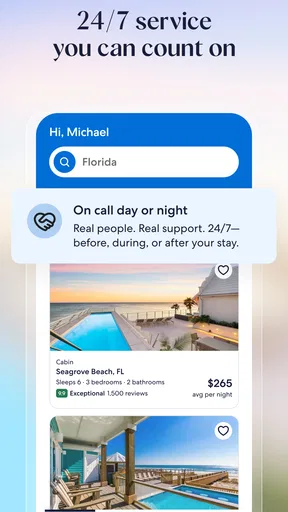
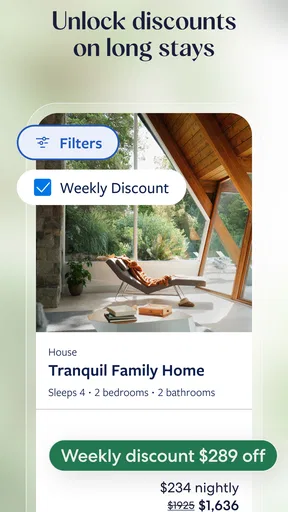
Our Review of Vrbo Vacation Rentals
 Analysis by Appyee
When a household starts planning a trip, the rental search can quickly become a group project: one person wants a kitchen, another cares about location, and someone else is comparing photos on a phone. I find Vrbo Vacation Rentals most useful when the goal is to narrow those choices together rather than book a room at the last minute. It is a travel app from Vrbo, and its focus on whole-home stays makes it a natural fit for families and groups who want shared space.
Start with the group’s non-negotiables
Before scrolling through appealing photos, I’d agree on the basics with everyone travelling: dates, guest count, a sensible price ceiling, and any needs that would rule a place out. In a shared-device situation, that small conversation matters. A saved rental can look like a group decision even when only one person has checked the sleeping arrangements, location, or practical details.
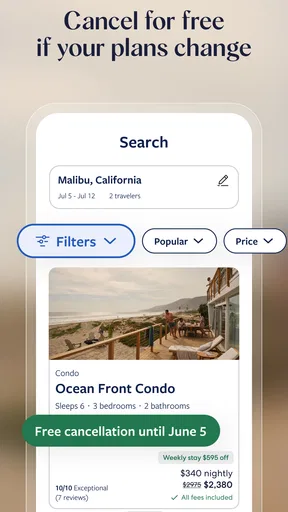
The app’s search is built around destination, dates, and guests, with filters that can help focus the results. I’d use those filters to remove clear mismatches first, then compare the remaining homes for details that are harder to summarize in a checkbox, such as whether the layout works for the group. A property that looks perfect in a wide-angle photo may not suit a household if everyone needs a quiet place to sleep.
Sharing ideas without sharing account access
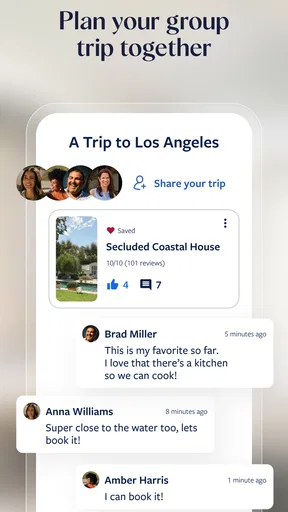
Trip boards give a group a way to collect candidate properties and share them for discussion. That is more useful than sending a stream of screenshots, because the group can return to a shortlist and compare options in context. I’d treat a board as a planning aid, though, not as proof that every person has approved a booking or that every important detail has been checked.
For a household using one device, I’d keep the account boundary simple: the person responsible for the booking should manage the account and payment steps, while other travellers can review options through the shared planning process. Avoid leaving a device signed in if other people use it for unrelated tasks, especially once trip details or payment screens are involved. The app is a rental-search tool, not a substitute for agreeing who is authorized to make the final decision.
Questions worth settling before booking
When a listing makes the shortlist, I’d check its description and reviews carefully, then use the owner chat to ask about any detail that could affect the stay. That might mean clarifying how a feature works for your particular group, or checking a practical point that is not obvious in the photos. Sending one clear message with a few specific questions is more effective than assuming a picture tells the whole story.
One trade-off with vacation rentals is that the home itself becomes part of the trip. A hotel may be simpler when you want a familiar front desk and a more standardized stay; a rental can be better when you value a private shared living area or want room to prepare meals. I would compare the full listing details and total booking terms rather than choosing solely by the nightly-looking price or the most attractive image.
Who will get the most from it?
I’d recommend Vrbo to people planning a family break, a reunion, or a trip with friends where having a common space matters. It can also help couples who prefer a self-contained place over a conventional hotel room. It is less compelling if you only need a bed for one night, want staff readily available throughout your stay, or would rather avoid the extra work of evaluating a specific property.
For a realistic example, imagine relatives coordinating a long weekend. One person searches near the destination, another checks whether the layout suits the group, and everyone compares a small set of saved homes before the booking lead asks the owner about a detail that matters. The useful part is not simply finding a large place; it is making the trade-offs visible early, before anyone commits money or assumes a feature is included.
The app is free to download, rated for Everyone, and has a 4.8 average from around 291,000 ratings. It has been available since 2017, and its current version is 2026.4.1. Those figures suggest a well-established service, but I would still judge an individual rental by its recent feedback, listing information, and fit for the trip rather than treating the app’s overall rating as a guarantee about a particular host or home.
Finding Your Home Away From Home
So, imagine you're planning a trip. You want something cozy, unique, and perhaps a little more private than your average hotel room. That’s where Vrbo Vacation Rentals comes in. The app is like a treasure trove of vacation homes, offering everything from beachside villas to rustic mountain cabins. Seriously, if you can dream it, you can probably find it here.
Once you fire up the app, the first thing you'll notice is how user-friendly it is. The interface is clean and intuitive, which means you won’t be fumbling around trying to figure out how to book that dreamy lake house. Just punch in your destination, travel dates, and the number of guests, and voilà – a list of stunning properties at your fingertips. And trust me, the photos are drool-worthy.
Features that Make It Stand Out
One of the coolest things about Vrbo is the filter options. Looking for a pet-friendly place? Or maybe a property with a pool and hot tub? No worries, just tick the boxes, and the app does the rest. It’s like having a personal assistant who knows exactly what you want in a vacation rental.
And speaking of personal touches, the app offers a detailed map view so you can see exactly where each rental is located. This is super handy if you’re someone who likes to plan your trip down to the last detail or if you're keen to explore the local area.
Another gem is the trip boards. You can save your favorite properties and share them with family or friends. Perfect for group trips where everyone needs to agree on the perfect spot. Plus, the app lets you chat directly with property owners, making it easy to ask questions or make specific requests before you book.
Booking Made Simple
When it’s time to book, the process is as smooth as butter. The app walks you through the steps, from confirming dates to payment, ensuring that everything is straightforward and secure. It’s a relief to know that you can handle everything from the palm of your hand without any hiccups.
And if you’re anything like me, you probably appreciate a little peace of mind when traveling. Vrbo offers a range of protection options, so you can rest easy knowing you’re covered in case of any unexpected travel changes or issues. It’s those little things that make a big difference.
The Joy of Discovery
One delightful aspect of using Vrbo is the sheer variety of properties available. Whether you’re looking for a quaint cottage in the countryside or a sleek condo in the city, there’s something for every taste and budget. It’s like having a world of unique accommodations right in your pocket.
And let’s not forget the reviews! Real feedback from other travelers gives you a clear picture of what to expect. I always appreciate a heads-up about local gems or any quirks a property might have. It’s like having insider tips from someone who’s already been there.
Looking beyond the photos
For me, the best way to use a rental app is to treat each result as a possibility to investigate, not a promise. Photos help establish the mood and give a sense of the rooms, but they cannot answer every practical question. I compare the written details with the pictures and reviews, paying particular attention to anything that could change how the group uses the home. If a feature is essential, I would confirm it directly rather than make a booking based on an assumption.
The map view is especially helpful when the destination is unfamiliar. I use it to think about the shape of the trip: whether the place looks convenient for the activities we have planned, and whether we are choosing a home for its setting or merely because its listing looks appealing. A map pin is a starting point for judging location, not a replacement for checking the address and the surrounding area carefully.
Making the shortlist work harder
A practical approach is to save a few genuinely different options rather than filling a board with near-identical homes. One might be better located, another more comfortable for a larger group, and a third may have the features that matter most. That comparison makes the compromise visible. It also helps a group avoid endless browsing, where every new property resets the discussion instead of moving it toward a decision.
Reviews are most valuable when read for patterns and relevance. I look for comments that relate to my own priorities, such as how a home worked for a group or whether a feature matched expectations, rather than treating one person’s preference as universal. A complaint that would be minor for one traveller may be decisive for another. Recent, specific feedback is more useful than a vague impression that a place is simply lovely.
Choosing the right kind of stay
Compared with general hotel searching, Vrbo puts the individual rental home at the center of the decision. That is an advantage when a private living area, a kitchen, or room for several travellers is central to the trip. It can be a disadvantage when consistency and on-site assistance matter more than space. If plans are uncertain, the group should pay close attention to the terms shown during booking and decide whether the property’s arrangements suit them before proceeding.
It is also worth asking whether everyone actually needs a whole home. For a brief stop between travel legs, a hotel may be less work and easier to evaluate. For a longer stay with relatives, separate bedrooms and a shared room can make a rental feel more practical. I would not choose a vacation home just because it seems more special; the best option is the one whose setup supports the way the group will spend its time.
Vrbo is developed by Vrbo and sits in the travel and local category. It has over 10 million installs, and the app’s search covers a large range of vacation-rental possibilities. That breadth is useful for comparing different kinds of homes, although a large selection can also mean more work: filters, maps, descriptions, owner messages, and reviews all matter when a group is making a careful choice.
Account, age, and trust in a shared household
The Everyone age rating makes the app suitable for a broad audience, but it does not mean every booking task should be handled by every person in a household. I would let younger travellers help identify what they want from a stay, then keep account and payment decisions with the adult or trip organizer responsible for the reservation. That is a sensible boundary for any shared-device planning, without assuming the app provides household controls.
Trust also means being clear about what the group has and has not agreed to. A saved home is an idea, a message to an owner is a question, and a completed booking is a commitment. Keeping those stages distinct prevents someone from mistaking a shortlist for a confirmed plan. Before paying, I would have the booking lead read the details aloud or share the relevant terms with the group so everyone understands the choice.
Because the app is free, it is easy to use it during early brainstorming without committing to a stay. The meaningful decision comes later, when the group has compared the property information and booking conditions. If a family needs a highly predictable, staffed environment, or if the main traveler is uncomfortable handling a property-specific arrangement, a hotel or another lodging option may be a better fit.
My household verdict
For shared planning, I like Vrbo best as a way to turn scattered preferences into a focused list of homes the group can actually discuss. Its map, filters, saved trip boards, reviews, and owner chat each serve a different point in that process. The app cannot make a group agree, and it should not replace careful reading, but it gives the organizer useful ways to compare options before taking the final step.
I would choose it when having a private home is part of the point of the trip and the organizer is willing to check the details. I would skip it when convenience, standardized service, or a quick overnight stay matters more than space and choice. That distinction is the key to getting value from a rental search: match the app to the kind of stay you want, then judge each property on its own merits.
Final Thoughts
All in all, Vrbo Vacation Rentals is a fantastic companion for anyone looking to make their travel dreams a reality. It’s easy to use, packed with features, and offers a personal touch that makes finding and booking your next getaway a breeze.
So next time you’re yearning for a break from the everyday grind, give Vrbo a whirl. Who knows? Your perfect vacation home might just be a click away. Happy travels!
Privacy and Permissions
See what permissions an app requests and how it handles your data.
- Identity
- find accounts on the device, add or remove accounts
- Calendar
- read calendar events plus confidential information, add or modify calendar events and send email to guests without owners' knowledge
- Contacts
- find accounts on the device
- Location
- approximate location (network-based), precise location (GPS and network-based)
- Phone
- read phone status and identity
- Photos/Media/Files
- read the contents of your USB storage, modify or delete the contents of your USB storage
- Storage
- read the contents of your USB storage, modify or delete the contents of your USB storage
- Camera
- take pictures and videos
- Microphone
- record audio
- Wi-Fi connection information
- view Wi-Fi connections
- Device ID & call information
- read phone status and identity
- Other
- view network connections, create accounts and set passwords, connect and disconnect from Wi-Fi, expand/collapse status bar, full network access, read sync settings, run at startup, reorder running apps, use accounts on the device, prevent device from sleeping, toggle sync on and off, read Google service configuration
Verdict
Strengths of Vrbo Vacation Rentals
- Wide range of rental options available.
- User-friendly interface for easy navigation.
- Detailed property descriptions and photos.
- Secure booking and payment process.
- Responsive customer support team.
Limitations of Vrbo Vacation Rentals
- Search filters can be limited.
- Occasional discrepancies in property listings.
- Mobile app may have minor bugs.
- Cancellation policies vary by host.
- Not all listings have instant booking.
Similar Picks in This Category
View All
Google Maps
Google LLC3.4

Google Maps Go
Google LLC4.1

Booking.com: Hotels & Travel
Booking.com Hotels & Vacation Rentals4.8

Google Earth
Google LLC3.8

Skyscanner Flights Hotels Cars
Skyscanner Ltd4.8

trivago: Compare hotel prices
trivago N.V.4.4
Frequently Asked Questions
What is Vrbo and how does it work?
Vrbo is a platform that connects travelers with property owners offering vacation rentals. Users can browse listings, check availability, and book directly through the app. Once a property is selected, travelers can communicate with the host for further arrangements. Payments are typically processed securely within the app, ensuring a smooth transaction.
Is Vrbo safe to use for booking vacation rentals?
Yes, Vrbo is generally considered safe for booking vacation rentals. The platform offers secure payment options and has a robust review system to provide users with insights from previous guests. However, it’s always important to read reviews and check the host's profile before finalizing a booking to ensure a positive experience.
What types of properties can I find on Vrbo?
Vrbo offers a wide range of properties that cater to different needs and preferences. Users can find everything from cozy apartments and beachside condos to luxurious villas and rustic cabins. The platform allows users to filter searches based on property type, location, and amenities to find the perfect rental for their vacation.
How does Vrbo handle cancellations and refunds?
Cancellation and refund policies on Vrbo vary depending on the host. It’s crucial to review the specific cancellation policy for each listing before booking. Some hosts offer flexible cancellations with full refunds, while others may have stricter policies. Always communicate with the host if you have questions about their cancellation terms.
Can I contact the property owner before booking on Vrbo?
Yes, Vrbo allows users to contact property owners prior to booking. This feature is helpful to clarify any questions or special requests you may have. Communicating with the host beforehand can also provide assurance and help you gauge the responsiveness and hospitality of the property owner.
